
Robotics, coding and electronics
Arkkibotics
For schools and camps that want students building, wiring and programming a working machine rather than watching one demonstrated.
- 90 min
- Per session
- 8
- Sessions per block
- 1:12
- Facilitator to students
- All kits
- Supplied by GLS
How students work
The build, test, fix loop
Mechanical assembly, 30 minutes
Build
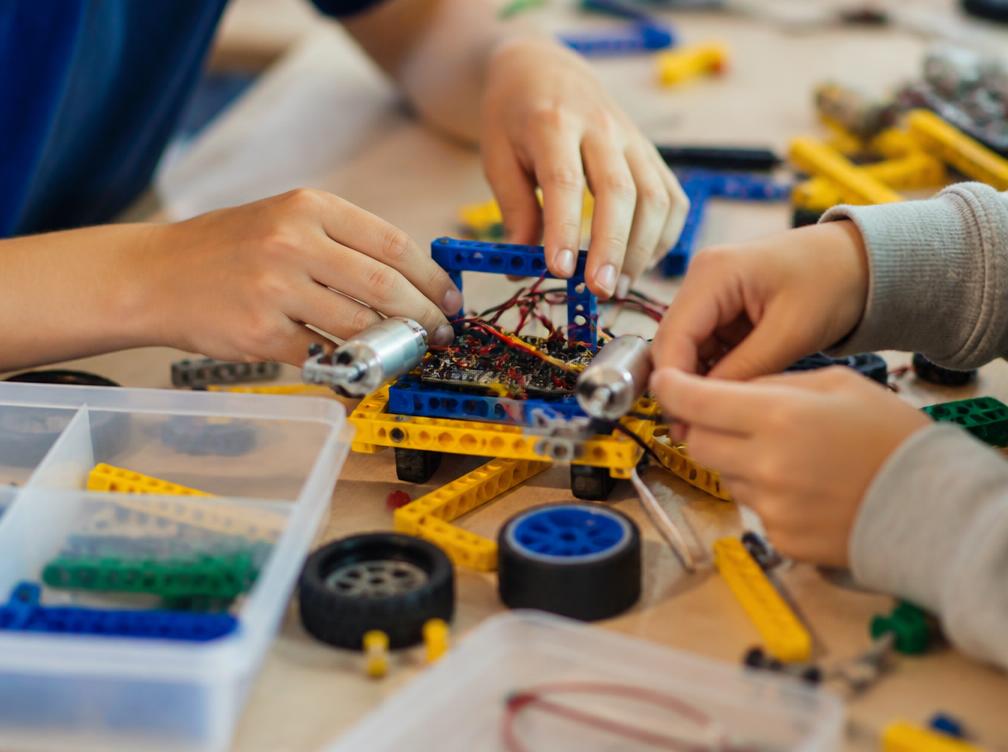
Teams assemble or modify the machine: chassis, drive, mechanism. Every choice is theirs to defend, and every part goes on with their own hands.
Select a stage to see what happens in it.
Code and behaviour
Change one thing, run it again
Control program
loop:
  distance = read(distance_sensor)
  if distance < 20 cm:
    stop()
  else:
drive(speed = 60)What the robot does
The robot stops clear of the wall. This is the combination a team is aiming for: quick enough to score, cautious enough to survive the run.
Change one value at a time. That single rule is the whole method.
Equipment
Inside the kit
Chassis
The frame students assemble first. Getting it square and rigid is the difference between a machine that tracks straight and one that veers.
Session and term
How it is structured
90 minutes, same shape every week
Inside a single session
Brief and recap
10 minThe challenge for the session, plus what broke last week and why.
Build
30 minMechanical assembly or modification of the machine.
Wire and code
30 minConnect sensors and motors, write or edit the control program.
Test and iterate
15 minRun against the challenge, diagnose, change one thing, run again.
Log
5 minRecord the change and the result in the build log.
8 sessions, building on each other
Across repeated sessions
Sessions 1–2
First machine moving
Chassis assembled, motors wired, first program uploaded. Every student drives something they built on day one.
Stage 1 of 4Sessions 3–4
Sensors and reactions
Distance and line sensors added. Teams move from fixed instructions to a machine that responds to what is around it.
Stage 2 of 4Sessions 5–6
Diagnose and rebuild
Deliberate faults and failed runs. Teams isolate causes, change one variable at a time and keep a build log.
Stage 3 of 4Sessions 7–8
Challenge and present
Machines run the scored challenge, then teams explain their design decisions and what they changed to the group.
Stage 4 of 4
Program specifications
Who it is for
- Year levels
- Years 4 to 10
- Group size
- Up to 24 students
- Ratio
- 1 facilitator to 12 students
- Prior experience
- None. Students who have never written a line of code start in the first session.
How it runs
- Settings
- School, studio, holiday camp
- Delivery mode
- In person
- Session length
- 90 minutes
- Format
- Term block of 8 sessions, or a 3 day intensive
What you need
- What GLS brings
- Robotics kits, components, spare parts and all consumables.
- What the venue provides
- A room with tables and power that can stay set up between sessions where possible.
- Lead time to book
- 6 weeks, longer in Term 4
In the room
What participants do
What they practise
- Systems thinking
- Coding logic
- Electronics fundamentals
- Fault diagnosis
- Iteration and testing
- Technical communication
What they leave with: A working robot the team has built, wired, programmed and iterated at least twice, with a short build log documenting each change.
Alignment
Curriculum alignment
Arkkibotics is written from GLS robotics delivery, not from the Arkki architecture library. The Arkki pedagogy behind it is documented on the Arkki Australia page rather than repeated here.
- Digital Technologies: algorithms, implementation and digital systems
- Design and Technologies: engineering principles and systems, and the design process
- Science: energy transfer, forces and fair testing
- Critical and Creative Thinking general capability
Reporting
What you receive afterwards
At the end of a block the school receives:
- Attendance and participation by session
- A per-team build log summary showing what was built and how many iterations were run
- Facilitator observations against the practised skills, at cohort level
- Photographs of final machines, subject to the school's image permissions
Suitability
Is this the right program for you?
Best for
- Schools wanting a sustained technology block, not a one-off show
- Students in Years 4 to 10 with no prior coding experience
- Sites that can leave equipment set up between sessions
Not the right fit if
- A single incursion day. The schools stream covers one-off delivery instead
- Under Year 4. Fine motor and wiring demands are too high
- Rooms shared with other classes that must be fully packed down each session
FAQ
Questions we are asked about this program
- Do students need to know how to code first?
- No. The first session assumes zero experience and every student writes and uploads code that day.
- What happens if a kit breaks?
- Spares are carried to every session. A broken part is treated as part of the diagnosis work, not an interruption.
- Can the school keep the kits?
- Kits stay with GLS between blocks so they can be maintained and restocked. Schools that want to keep running projects afterwards can ask for continuation or purchase options as part of the proposal.
- Is this the same as Arkki?
- No. Arkki is design and architecture education. Arkkibotics is robotics, coding and electronics, run by GLS with its own equipment and instructors.
Ready to scope this for your setting?
Send us the cohort, dates and setting and GLS will return a scoped program, staffing model and cost.